Registration Policies & Guides
← Back to Advising Information
This page provides guidance for course registration, key policies, deadlines, and resources.
Contents:
- How to Register for Classes
- Registration Holds and Authorizations
- Add/Drop and Withdrawals
- Other Policies
Quick Links
- Self-Service – student portal for registration, grades, transcripts, and degree audits.
- Academic Calendar
- Meet with an Advisor
- Registrar’s Office page
- Registration Change (Withdrawal) Form – fill out and send to registrars-office@northwestu.edu
How to Register for Classes
- Open Self-Service and click the Cart icon in the top right corner
- Make sure that you have no registration holds and that you have received advisor authorization (scroll down for more information)
- Add courses to your cart by searching the class list and clicking “add”
- Kirkland Undergraduate students: make sure the class you select says “Session: Main” in the description. You will not be able to register for classes labeled “Session: MAIN January”, “Session: MAIN May”, etc.
- Once the registration window for your class standing opens, click “Register”.
- Self-Service frequently has a variety of issues with registration, particularly for transfer students. If you are not able to register for a class, please email the Registrar’s Office and your advisor for assistance.
Registration Holds and Authorization
Registration Holds prevent students from registering for a variety of reasons. You can tell you have a financial hold if your cart in Self-Service says, “Account is in Stop List”, like below:

The most common hold is a financial hold, which indicates you have an outstanding balance on your student account. Students with financial holds must clear their accounts before registering. If you need assistance with your account, please contact Student Financial Services.
Another common hold is an SAP Hold. This is when a student fails to make Satisfactory Academic Progress, resulting in academic suspension or dismissal. SAP Can Appeal means that you can still submit an appeal. SAP Dismissed from NU & Fin. Aid means that your SAP appeal has been denied, and you cannot at this time register for classes at NU. If you have an SAP hold on your account, please contact the Advising office so that we can support in your next steps.
Other holds are possible but rare. If you have a registration hold and aren’t sure why, please contact your Academic Advisor.
Advisor Authorization is also required for all students before registering. If you have not received advisor authorization to register, you will see this message above your cart in Self-Service:
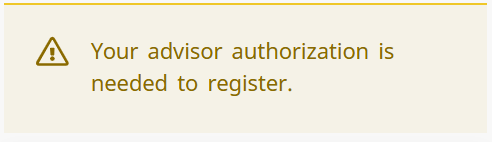
Students must meet with their advisor to receive authorization. Make sure your advisor authorizes you in your appointment!
Add/Drop and Course Withdrawal
Students can add or drop classes up until the end of the first week of classes. During the add/drop period, classes you drop will not stay on your transcript. You can drop a class by clicking the trash icon next to the course in your cart in Self-Service.
During add/drop week, the Advising Office is available for drop in appointments to help adjust course schedules. It is very common to change your class schedule during the first week, so please come see us if you need assistance!
Course withdrawal is a separate process from a course drop. Unlike dropping a course, you can still withdraw up until the end of the 12th week of the semester. You will receive a final grade of a “W” for the course, and it will not impact your GPA; however, it will stay on your transcript and count as a “course not completed”. This may be a good decision to help protect your GPA if it does not appear you will be able to pass the course.
To withdraw from a course, fill out the Registration Change Request form and send it to the Registrar’s Office. Always consult with an advisor before withdrawing from a class!
Other Policies
- Students must be registered for 12-18 credits to be considered full-time. Students under full-time registration may not be eligible for the same financial aid or housing. Students registered above full-time (overload) may be subject to extra charges.
- If you are missing pre-requisites for a course, you will not be able to register for that course in Self-Service.
- Note: sometimes, Self-Service doesn’t properly recognize pre-requisites, especially for students with transfer credits. If Self-Service doesn’t let you register for a course that you are eligible for, contact the Registrar’s Office.
- If a course is already full, you can join the waitlist in Self-Service. For most courses, joining the waitlist is a first-come, first-serve process; if space opens, students will be added according to the order they joined.
- For some courses, priority may be given to students who need the course for their major, regardless of order of registration. In some cases, students may even be “bumped” (removed) after registering for a course if another student needs the course for their major sequence.
- If you are waitlisted for a course, please do not contact the instructor and ask to be added to the class. Although this is a common practice at other universities, it is not common at NU. If you are concerned about your degree progress due to being waitlisted for a course, please contact your advisor.
- If you are repeating a course, you will not be granted credit for that course (except for certain course types, such as music ensembles, private lessons, athletics, etc.). If you achieve a higher grade in the repeated course, it will replace your prior grade in your transcript (represented by brackets [ ] placed around your grade).
If you have further questions, please refer to the Registration FAQ or email advising@northwestu.edu